Get Show Here
iPods in Education–Article from Dallas-Fort Worth Star-Telegram
Word 2007 online conversion tool
.docx is the default file format in the latest version of Microsoft Word in Office 2007. All docs in the new office family is based upon an open, standardized specification called Office Open XML.
.docx-files are not backwards-compatible with previous versions of Word.This simple web-based conversion tool is the solution for you!. In a simple 1-2-3 process you can upload your document, choose target format and seconds later download the document in a readable format.
Great Technology as Tool ads from El Paso ISD
Refresh page to see different ads.
Apps of the Episode
Block Posters
LetterPop–Newsletter Making
Take Five with Matthew Cone of Macinstruct.
Check out the Tutorama tutorial contest.
Steve Jobs "attack" on Teacher Unions
Houston Chronicle Report
Response from the Mac Blogosphere
Ars Technica
MacDailyNews
Wired
From the edublogosphere there has not been much reaction. Here are the first I've seen. Assorted Stuff
See You in a Few!

Monday, February 19, 2007


Tuesday, February 13, 2007
One Show This Month on the 20th
Due to some work, health, and family related issues I need to skip the podcast scheduled for the 5th. I will be back on the 20th with a full show. Thanks for your indulgence.
See You in a Few!
See You in a Few!
Thursday, February 01, 2007
TheEducationalMac Podcast #37
Click Here to Download
Review of Macworld, impact on education
iPhone
Apple TV
Airport Extreme
iLife and iWork (lack thereof)
Take Five with Richard Miller
Application of the Podcast - PagePacker
See You in a Few!
Sunday, January 21, 2007
Podcast #37 up in a couple of days
I am just a little behind due to some family emergencies. Podcast #37 will be up by Tuesday.
See You in a Few!
See You in a Few!
Thursday, January 04, 2007
The Educational Mac Podcast #36-January 5, 2007
Download the Podcast Here
Show Notes
Macs in Education News
Florence, S.C. school district gets iMacs, iPods–Macsimum News
Illinois district to rid itself of computers that have nothing to do with "The Real World"–Macsimum News
Show Notes
Macs in Education News
Florence, S.C. school district gets iMacs, iPods–Macsimum News
Illinois district to rid itself of computers that have nothing to do with "The Real World"–Macsimum News
Software Beat
http://www2.blogger.com/img/gl.link.gif
A reminder about FreeMacWare.com
Macworld Hopes (not predictions)
Macworld Conference Education Track
Cell Phone Ban in New York, New Proposal, Takes from the edublogosphere
Will Richardson
Danah Boyd
Tom Hoffman
Next show, Macworld roundup, The Educational Mac perspective.
See You in a Few!
Tuesday, January 02, 2007
New Podcast
The new work podcast I talked about in Sunday's show is out. It is called T4 Tips and it is fun working as a group on the podcasts. If you want to check it out, click on the link. You can subscribe via iTunes. Search for Jordan T4.
Saturday, December 30, 2006
The Educational Mac Podcast #35-December 31, 2006
Get the Show Here
End of the year 2006. It has been a year that has flown past for me, personally and professionally.
The Future of The Educational Mac
New work related podcasts coming
Okay, enough about the future. It is time to look at the past, as in the past year. As I mentioned at the top of the show, this year has flown by for me. So it is good for me to stop and reflect a little bit. I am going to go into year-end list mode.
Now everyone does 5 item or 10 item lists, but in honor of the year 2006 I am going to present my top six lists in 5 categories. I was too lazy to do six.
Category One–My top podcast listens (non-educational) One that is gone that I really miss it The Wizards of Technology. The passing of Digital Bill was a shock and leaves a big hole in the tech podcasting community.
6. Your Mac Life–Shawn King irritates the he** out of me, but he does a pretty good job with guests and I am jealous as all get out that he and Lisa are working with and for David Pogue.
5. iLife Zone–I really like this Mac-centric podcast, especially when they actually focus on the iLife tools. I have learned quite a few new tricks and tips from this one.
4. Mac OS Ken –I used to really like Inside Mac Radio, but when Ken and Laura Burstein left/were kicked out, a lot of the life went out of the show. I was glad that Ken started his own show. It is nice to have a daily dose of Mac news in a podcast format.
3. Daily Giz Whiz–If you don't listen to this daily show from Leo Leporte and Dick DeBartolo, you are missing 15 minutes of fun a day. I really like it when Dick talks about Mad Magazine or his work on The Match Game.
2. ESPN's Pardon the Interruption–I use to be a complete sports nut. I got a little tired of sports talk radio though. I do love this show from ESPN though and since I don't have cable or a dish it is great to be able to get this show as a podcast.
1. TWIT–Okay, I know it is not Mac specific. I also know that I should probably despise John C. Dvorak, but he and the TWIT show are a guilty pleasure each week. When Leo threatened to quit the show a few months ago, I really panicked.
Category Two–Top Educational Podcast listens. This list has changed. It seems that many of the early shows that I listened to have gone away. I miss One Big Head, Teach42 (I'll give Steve a pass because of the baby), Paradigm Shift, and Room 208.
6. Teaching for the Future with Dave LaMorte–This is a fairly new one that I am still getting a handle on, but as an up and coming teacher, he has a lot of good things to say.
5. The Savvy Technologist–This one may have to go into the gone away pile soon. Tim Wilson is a great podcaster. His new job has apparently bitten into his podcasting time. I hope he can get it back going again.
4. Moving at the Speed of Creativity–Wes Fryer is one who has kept up and I really like his deep thinking on topics. I do sometimes have trouble with the length of some of the shows though.
3. Geek!Ed!–The band of merry educational technologists from Michigan put out an entertaining show each week. I usually learn something too. Can you say WII.
2. Connect Learning–David Warlick continues to produce, particularly when presenting at a conference. I really enjoy those shows and he lets the audience participate and we get to hear what others are thinking and questioning. His keynote for the K12 Online Conference was outstanding.
1. Infinite Thinking Machine–This again is a fairly new show. It is a vidcast, but professionally done by Chris Walsh and others. They have also enlisted Vint Cerf to do segments which are great. With the few shows they have done, they have quickly become my favorite.
Category 3–Blogs
My blog subscription list is overly long and I spend too much time daily perusing new posts. However, here are 6 educational blogs I would never prune.
6. 21st Century Collaborative–Sheryl's blog is a must stop for me. She is really on top of what is going on in EdTech. Her leadership on the K12 online conference was spectacular as well.
5. The Fischbowl–Karl Fisch gives a great accounting of what goes on in his school with Web 2.0 and other tools. His trilogy of videos are also great tools.
4. Dangerously Irrelevant–Scott McLeod does a great job of presenting the case that our administrators are ill-prepared for the task of integrating technology in our schools. If I were to enter an administrative program I would want it to be Scott's.
3. Moving at the Speed of Creativity–Wes Fryer is one of the most prolific edubloggers out there. I can't say I fully read all of his posts but there is always at least one a day that makes my head hurt.
2. 2 Cents Worth–David's blog is another one that makes my head hurt on a consistent basis. But what I really like is the conversations he sparks in the edublogosphere.
1. Weblogg-ed–I am not sure I got Will Richardson until I heard him speak at NECC this year. Now I do and I am glad that many others listen. Will is one that I believe will help change education in this country.
Category 4–Educational Events
6. Work–Lots of changes, not many for the better. Overload on things that I don't feel are that important but that others do. On the plus side we are beginning to see the roll out of social software tools in the district as well as a couple of other projects that could prove interesting.
5. UCET Conference–This one because I was responsible for it. It is amazing what a small group of dedicated individuals can do.
4. K12 Online Conference–I was not involved except as a participant, but see #5 above.
3. EduBlogger Meetup at NECC–Putting faces with voices and written words was terrific. It makes the online life much more compelling for me.
2. NECC–This is usually the highlight of the year for me. It was a great conference. But what made it great was all of the conversations going on around and throughout the conference, but not at the conference.
1. David Warlick's visit to JSD. David spelled out things for our district that maybe we weren't quite ready to hear. But his message did get through and is making an impact now almost a year later. We will get to hear David again this year as he keynotes the UCET 2007 conference.
Category 5–Favorite Toys/Gadgets/Software of the Year (Ones that I have personally experienced)
6. Bluetooth Headset for Cell Phone–This one was really a necessity because the speaker on my phone is useless. I look like a reject from Star Trek TNG, but I can answer phone calls and didn't have to give up the phone I really like.
5. Logitech USB Headset–This has made the podcast easier to produce and I hope easier on your ears.
4. HP LaserJet 3050 All-in-One. This one I got for Christmas and I love it. My Stylus C86 has been crapping out for the past few months and I was getting tired of replacing ink every month. The 3050 is an older model, but it is perfect for my needs. I love having a laser printer again. The other capabilities are cake.
3. Magnavox 15" HDTV Monitor–We bought this as a replacement TV for our custom van. However, I have used it more as a 2nd monitor for my laptop at home. It makes a big difference to have the extra screen real estate available to work in.
2. Comic Life–Although this has been out almost 2 years, I finally wised up to it this year. It is so versatile, yet easy to use. I have had teachers who wouldn't do anything with their students in a lab before spend weeks on different projects. I love this software.
1. Video iPod–I really believe this device can revolutionize what teachers do in the classroom. To be able to download video and show it on a TV or projector easily could really be a boon. This device in conjunction with our statewide media download service should really be a useful tool in our teachers arsenal.
Well those are my lists and year end wrap up so to speak. I hope all of you and yours have had a marvelous winter season. It's now time to get back to work. I hope that 2007 brings you enjoyment and enrichment.
See you in a few!
Saturday, December 23, 2006
Happy Holidays from the Educational Mac
Whatever you may be celebrating this time of year. Best Wishes to all.
Kelly @ The Educational Mac

Kelly @ The Educational Mac
Thursday, November 30, 2006
Wow, What a Concept!
As I continue through the day, something has struck me. I can clearly remember when my youngest child was born 11 years ago. There was some pretty amazing technology in the room. Today as I look around my mom's room, what strikes me is that there is even more technology and it has been completely integrated into the hospital routine and experience. My mom's nurse is older than I am (and that's all I am saying about that), but she uses the computer in the room to input Mom's vitals every half-hour. I wonder if she had to go to hours and hours of professional development .
There are doctors, nurses, aides all using computers at various stations in the hallways. (I would have paid $100 for a digital camera to take a picture of the doctor using a Dell computer, looking at iMacs on the Apple website. I need a new cell phone with decent picture taking abilities.) While I am sure that they have all received training, there is no debate over whether they will use it or not. They just do. What to they use it for? To share information and data (can you say collaborate) to help do their jobs to the best of their ability.
Hmmm!
Makes the Waiting Much Better
So I am at the hospital waiting for my mother to come out of surgery (scheduled not emergency). I brought my laptop for the 2+ hour wait, to work on a presentation. I open up the PowerBook and the Airport signal indicator shows a full strength signal. Could it possibly be? Yes, the hospital has free public wi-fi available. Now I'll never get the presentation done.
Sunday, November 19, 2006
Thursday, November 02, 2006
The Not a Podcast Vidcast
Get the vodcast here
Between business and vacationing a podcast has been impossible this month. I did however put together a little gadget review for a meeting that I had to bail on tomorrow. So I am posting that and hope I that you will forgive my laziness this month.
Thursday, October 05, 2006
Have a Good Rest Digital Bill!

A report from MacMerc has informed us of the passing of "Digital Bill", Bill Douthett of the Wizards of Technology Podcast and website. The WOT was one of the first technology podcasts and the second podcast I subscribed to in Dec. of '04. Bill gave us advice on starting TEM and I will always be grateful. I will miss Bill and the podcast. To his friends and family, The Educational Mac expresses our condolences
See You in a Few, Bill!
See You in a Few, Bill!
Sunday, September 24, 2006
The Educational Mac Podcast #34-September 23, 2006
Show notes for TEM #34
Thanks for Listening
Apple introduces new iMacs, new iPods, an iTV, and oh yeah, movies.
An interview with one of the founders of PB Wiki, Ramit Sethi.
My new videocast venture, a purely indulgent work called Rewind. The feed is feed://feeds.feedburner.com/wordpress/sWbj.
See You in a Few!
Thanks for Listening
Apple introduces new iMacs, new iPods, an iTV, and oh yeah, movies.
An interview with one of the founders of PB Wiki, Ramit Sethi.
My new videocast venture, a purely indulgent work called Rewind. The feed is feed://feeds.feedburner.com/wordpress/sWbj.
See You in a Few!
Thursday, September 07, 2006
The New iMacs
The new iMacs yesterday are very impressive. A lot has been made in the Mac press about the $999 iMac. If you check the specs, this is the iMac for education offered to everyone. Apparently though the restriction on the educational iMac for $899 for institutional puchase only has been lifted. If you log into the education store for individual purchase you can now select the $899 iMac.
See You in a Few!
Sunday, September 03, 2006
A New Venture
No, I am not giving up The Educational Mac. But I am starting a new adventure in blogging/podcasting/vidcasting. The project was born out of my passion and belief in the power of storytelling, in particular, Digital Storytelling. Having organized a film festival for our elementary schools for the past 3 years, I see the need for examples for the students. I also want to be able to show the power of the tools we have available today. So I am embarking on a personal project to be one of those examples.
Through my life I have not been very good at keeping a journal. As I get older I am feeling a void because of the lack of a personal voice. Therefore this project is going to be my life story told in reverse from where I am now. The project is called Rewind. I realize it is in some ways a vanity project, but it is something I want to leave behind for my posterity.
However, I also see it as a way of putting my actions where my mouth is. If you would like to visit my personal time machine on occasion feel free to visit Rewind. The first entry will be available on Monday, Sept. 4th.
As I began, The Educational Mac is not going away, I will be back within a week with a new podcast, so...
See You in a Few!
Through my life I have not been very good at keeping a journal. As I get older I am feeling a void because of the lack of a personal voice. Therefore this project is going to be my life story told in reverse from where I am now. The project is called Rewind. I realize it is in some ways a vanity project, but it is something I want to leave behind for my posterity.
However, I also see it as a way of putting my actions where my mouth is. If you would like to visit my personal time machine on occasion feel free to visit Rewind. The first entry will be available on Monday, Sept. 4th.
As I began, The Educational Mac is not going away, I will be back within a week with a new podcast, so...
See You in a Few!
p.s. I am going to try a few things with Rewind including submitting to You Tube, Google Video and maybe a few others. The Feedburner feed for the project is feed://feeds.feedburner.com/wordpress/sWbj.
Wednesday, August 09, 2006
The Educational Mac Podcast #33-August 9, 2006
Show Notes
Interview with Zane about his Apple Camp experience
NECC Final Thoughts
Comic Life Review
Comic Life Tutorial
The Savvy Technologist podcast with Comic Life creators
A couple of thoughts about everything swirling around the Read/Write Web or Web 2.0 or whatever you choose to call it.
See You in a Few!
NECC Final Thoughts
Comic Life Review
Comic Life Tutorial
The Savvy Technologist podcast with Comic Life creators
A couple of thoughts about everything swirling around the Read/Write Web or Web 2.0 or whatever you choose to call it.
See You in a Few!
Wednesday, July 19, 2006
Live at Apple Camp
I am at the movie making Apple Camp with my son, Zane. I have found out a couple of things. 1) My son is much more shy around strangers than I realized. 2) He gets really quiet when he gets shy. I don't know if he is bored or just looking bored.
The Apple Store staff is doing a great job of working with the kids. The group my son is in is having a hard time coming up with ideas. But the camp counselor is working through it with them. It will be fun to see what they come up with.
I think this concept is a great idea from Apple and I hope they continue it in the future.
Zane and I are going to record a podcast later about the experience from his point of view.
The Apple Store staff is doing a great job of working with the kids. The group my son is in is having a hard time coming up with ideas. But the camp counselor is working through it with them. It will be fun to see what they come up with.
I think this concept is a great idea from Apple and I hope they continue it in the future.
Zane and I are going to record a podcast later about the experience from his point of view.
Friday, July 07, 2006
TEM Podcast 32 -NECC2006 Special #2
A great day at NECC.
One Laptop Per Child - Nicholas Negroponte Blog Entry
Your school media channel-Chris Walsh Blog Entry
Award Winning Digital Photography - Arnie Abrams
The Mega VCR -Hall Davidson
A Web of Connections - Will Richardson (I lost my blog entry, but here and here are a couple of good summations of the session).
The Savvy Technologist Edublogger Meetup
Roger Wagner
theeducationalmac necc2006 necc
One Laptop Per Child - Nicholas Negroponte Blog Entry
Your school media channel-Chris Walsh Blog Entry
Award Winning Digital Photography - Arnie Abrams
The Mega VCR -Hall Davidson
A Web of Connections - Will Richardson (I lost my blog entry, but here and here are a couple of good summations of the session).
The Savvy Technologist Edublogger Meetup
Roger Wagner
theeducationalmac necc2006 necc
Digital Photography-The Good, the Bad, The Ugly - Leslie Fisher
Leslie knows digital photography. I have seen her present before. Top problems with Digital Photography
Not Close Enough
Not in Focus-Press the shutter button halfway down to set the focus.
Camera Shake - What causes it? Lack of lighting. What can you do about it? Tripod or table, set a time, change the settings, use a flash.
Boring Composition-Use Law of thirds. Look for lines, Sapce makes you think, Shoot High/Shoot Low, If I see another...
Ignoring the background
Missing the Moment - Why does it happen? Camera trying to expose for everything. Use Sports mode. Warning, the faster the shot, the less light brought into the camera. Watch for underexposed shots.
Too Much Flash
Too little Flash
Why not Vertical? Digital Zoom - Crap
Wrong Settings - Pixels, Pixel = Pixel Info. The dots that make up the overall picture, Megapixel = 1 million pixels, 1280 x 1024,is 1.3 Megapixels, The more megapixels in your camera, the bigger the picture! The better the print, Pixel dimensions will vary by brand. Take Pictures as largest quality possible.
Camera Settings
Resolution
Camera Raw - Camera does not touch the image whatsoever.
Shutter priority
Aperture Priority
Exposure Compensation
White Balance Adjustment
Lighting - Friend and Foe, look for natural light sources, Hand Test Leslie is not allowed to reproduce the handout for this session due to a contract with a business, but check her site for her other handouts which are just terrific. necc2006 theeducationalmac necc
Not Close Enough
Not in Focus-Press the shutter button halfway down to set the focus.
Camera Shake - What causes it? Lack of lighting. What can you do about it? Tripod or table, set a time, change the settings, use a flash.
Boring Composition-Use Law of thirds. Look for lines, Sapce makes you think, Shoot High/Shoot Low, If I see another...
Ignoring the background
Missing the Moment - Why does it happen? Camera trying to expose for everything. Use Sports mode. Warning, the faster the shot, the less light brought into the camera. Watch for underexposed shots.
Too Much Flash
Too little Flash
Why not Vertical? Digital Zoom - Crap
Wrong Settings - Pixels, Pixel = Pixel Info. The dots that make up the overall picture, Megapixel = 1 million pixels, 1280 x 1024,is 1.3 Megapixels, The more megapixels in your camera, the bigger the picture! The better the print, Pixel dimensions will vary by brand. Take Pictures as largest quality possible.
Camera Settings
Resolution
Camera Raw - Camera does not touch the image whatsoever.
Shutter priority
Aperture Priority
Exposure Compensation
White Balance Adjustment
Lighting - Friend and Foe, look for natural light sources, Hand Test Leslie is not allowed to reproduce the handout for this session due to a contract with a business, but check her site for her other handouts which are just terrific. necc2006 theeducationalmac necc
Thursday, July 06, 2006
The MegaVCR: Media and More in Your Pocket - Hall Davidson
For me Hall Davidson is another can't miss. I have attended conferences where Hall has presented for about 10 years now. He has such a great presentation personna and knows his stuff. The things he has done with the California Multimedia Festival was the inspiration for what we have done with our district elementary film festival.
This session is about the video iPod. United Streaming license's now allow for download ing of their content. Showed a mix he did using Premiere Elements of US content with him overlayed. It is pretty amazing. Hall makes a pretty good case for teachers having video iPods. Showing other content from US on the iPod. Showed a few other videos. Now he is actually going to show the process of getting the video from download to iPod.
The thing about Hall is that no matter what he is presenting, he is entertaining and hilarious. It's too bad they didn't advertise the session better, the crowd was smaller but it was still fun and very informative. necc2006 theeducationalmac necc
This session is about the video iPod. United Streaming license's now allow for download ing of their content. Showed a mix he did using Premiere Elements of US content with him overlayed. It is pretty amazing. Hall makes a pretty good case for teachers having video iPods. Showing other content from US on the iPod. Showed a few other videos. Now he is actually going to show the process of getting the video from download to iPod.
The thing about Hall is that no matter what he is presenting, he is entertaining and hilarious. It's too bad they didn't advertise the session better, the crowd was smaller but it was still fun and very informative. necc2006 theeducationalmac necc
Award Winning Digital Photography Projects - Arnie Abrams
He is referring to the DeWitt Jones Keynote yesterday and mentions the creativity aspect. He will focus more on bringing this to the classroom. Handout available at Arnie's website.
Why bother
Visual Literacy
Visual Learners
Visual subjects
NETS Standards
Better, cheaper, easier cameras
New, fun, motivating
Instant results
Have your own darkroom
E-publishing
Cross-curricular projects
The Week That Was
Safety Do's and Dont's Poster
Research Project rather than paper
Getting Started with Digital Photography
Start with a specific assignment in mind
Portrait, motion, documentation
Going on assignment
Which is the Fake?
Make a commercial
Language Arts
Photo sequences or Every Picture Tells a Story . Story starters
Book Reports that come to life
Phoetry
Bilingual Photo Dictionary
Human Letters
Photo Flash Cards
Mystery Objects
Parts of Speech
Science
Special effects Photography - Time-lapse, Stop Motion, Panorama, Spin Object
Extreme Close Ups
Adopt a Tree
Social Studies
Virtual Postcards
Politics and Pictures
Two Sides to a Story
History Figure Cube
Our Town-Past, Present & Future
Math Projects
Pictures of Math
Counting Items
Patterns
Human Bar Chart
Fraction Photos
Social Skills
Illustrating Emotions
Teacher Tools
Visual Seating Chart
Student ID Cards
Enhance Field Trips
Camera Management Tips
Inexpensive cameras for student use
Standardize equipment
No "hand-offs"
Keep a camera handy
Keep spare batteries charged
Lots of memory cards
Digital Workflow
1. Capture - Shoot the picture, or scan, or have film transferred to digital, get a picture from the internet.
2. Transfer - Upload the pictures to a computer via the camera or a card reader
3. Edit - crop, correct or enhance.
4. Share - Print or share the photos electronically, back up to a CD or DVD
Useful web links at www.arnieabrams.net/dp_day.htm
Project Management Tips
Training Session
Student Licenses
Copy the Manual
Organize images into folders
Store file on external drives or CD/DVD
De-emphasize printing
Share photos on the web-Web photo albums
This session was as full at the DP session I attended yesterday. But I think this crowd got more out of it. The presentation was better and filled out the session time much better. Both presenters obviously enjoy digital photography, but Arnie showed more of a passion for it.
theeducationalmac necc2006 necc
Why bother
Visual Literacy
Visual Learners
Visual subjects
NETS Standards
Better, cheaper, easier cameras
New, fun, motivating
Instant results
Have your own darkroom
E-publishing
Cross-curricular projects
The Week That Was
Safety Do's and Dont's Poster
Research Project rather than paper
Getting Started with Digital Photography
Start with a specific assignment in mind
Portrait, motion, documentation
Going on assignment
Which is the Fake?
Make a commercial
Language Arts
Photo sequences or Every Picture Tells a Story . Story starters
Book Reports that come to life
Phoetry
Bilingual Photo Dictionary
Human Letters
Photo Flash Cards
Mystery Objects
Parts of Speech
Science
Special effects Photography - Time-lapse, Stop Motion, Panorama, Spin Object
Extreme Close Ups
Adopt a Tree
Social Studies
Virtual Postcards
Politics and Pictures
Two Sides to a Story
History Figure Cube
Our Town-Past, Present & Future
Math Projects
Pictures of Math
Counting Items
Patterns
Human Bar Chart
Fraction Photos
Social Skills
Illustrating Emotions
Teacher Tools
Visual Seating Chart
Student ID Cards
Enhance Field Trips
Camera Management Tips
Inexpensive cameras for student use
Standardize equipment
No "hand-offs"
Keep a camera handy
Keep spare batteries charged
Lots of memory cards
Digital Workflow
1. Capture - Shoot the picture, or scan, or have film transferred to digital, get a picture from the internet.
2. Transfer - Upload the pictures to a computer via the camera or a card reader
3. Edit - crop, correct or enhance.
4. Share - Print or share the photos electronically, back up to a CD or DVD
Useful web links at www.arnieabrams.net/dp_day.htm
Project Management Tips
Training Session
Student Licenses
Copy the Manual
Organize images into folders
Store file on external drives or CD/DVD
De-emphasize printing
Share photos on the web-Web photo albums
This session was as full at the DP session I attended yesterday. But I think this crowd got more out of it. The presentation was better and filled out the session time much better. Both presenters obviously enjoy digital photography, but Arnie showed more of a passion for it.
theeducationalmac necc2006 necc
Building Your Own Media Empire - Chris Walsh
Subtitle: Podcasting to Improve Communication & Training in Education Communities (handouts at www.epochlearning.com)
Looking at community driven content.
Agenda
1 - Understand Podcasting
2 - See/hear in action
3 - Create a simple podcast
RSS makes it all possible.
Your digital news wire.
It's democratic distribution of content
"The Long Tail" - Something for everyone
Blogs - Text entries, published periodically
Podcasts - audio/video episodes, published periodically (interesting comment on the content being personal)
Why Now? - ease of distribution, more bandwidth, better mobile devices
Time Shifting - listen or watch anytime
Place Shifting - listen or watch "anywhere"
Enables learning everywhere & all of the time
Instruction
Student Voices
Professional Development
Community Outreach
Home Communication
Plays examples of podcasts - they are listed on the handout. Doing an example podcast using the Odeo Studio
This was a very well planned out and executed session.
theeducationalmac
necc2006
necc
Agenda
1 - Understand Podcasting
2 - See/hear in action
3 - Create a simple podcast
RSS makes it all possible.
Your digital news wire.
It's democratic distribution of content
"The Long Tail" - Something for everyone
Blogs - Text entries, published periodically
Podcasts - audio/video episodes, published periodically (interesting comment on the content being personal)
Why Now? - ease of distribution, more bandwidth, better mobile devices
Time Shifting - listen or watch anytime
Place Shifting - listen or watch "anywhere"
Enables learning everywhere & all of the time
Instruction
Student Voices
Professional Development
Community Outreach
Home Communication
Plays examples of podcasts - they are listed on the handout. Doing an example podcast using the Odeo Studio
This was a very well planned out and executed session.
theeducationalmac
necc2006
necc
One Laptop Per Child-Nicholas Negroponte
The big keynote for the conference this year is Nicholas Negroponte and the "$100" laptop. He begins by talking about the project as a journey. Mentions Seymour Papert and his view on students programming and the benefits thereof. Negroponte spends much of his time in underdeveloped countries. Technology isn't about teaching, it's about learning. Introduces the concept of the $100 laptop.
Three basic principles - 1-Use technology to learn learning, not to learn something.
2-Teaching is one but not the only way to achieve learning.
3-Leverage children themselves.
History of his involvement in bringing technology to underdeveloped nations. Started with a few computers in a few locations, then moved to telecommunication(wifi, wimax, etc.) Communication is not a problem today. Project in Cambodia. At the same time Papert worked with the state of Maine on their laptop project. In Maine, they have discovered that teaching and learning is different. What is One Laptop Per Child? 1 - A non-profit entity of $30M funding for non-recurring engineering costs.
2 - About Scale, Scale, scale being global is curcial. Launch 5-10 million in 2007, 50-150 million 2008 > 5 large diverse countries.
3 - To provide to children: to own, to take home, to use seamlessly.
Partners Google, eBay, AMD, News Corp, Brightstar, Marvell, Nortel, Red Hat, 3M, Chi Mei, Quanta, Satellite - TBA, UN, IADB
A lot of laptops. How to get to $100.
•No sales, marketing distribution
•First Purchase Order 5-10M units
•Linux
•Reduce display cost leveraging backlight innovation
500 Mhz AMD x86 processor
128M dRAM
512M Flash
>2 W nominal, can be human powered
3 USB ports
Stereo sound, with 2 audio out
WIFI mesh network
Rugged
Dual mode Display - Spatial Color, Backlit, Transmissive, OLPC LCD Display, Sunlight Readable, Reflective
Camera under consideration
Working model should be on floor shortly Open Source
Skinny Linux
Instant on
Will be faster than your laptop
Parallel Commercial Channels
Whitebox and brands
Private labels
Maintenance by the kids
Design - not cheap, not toy
Color coding of machine for revision purposes. A pivot screen. Crank moved to power supply to reduce wear on the laptop. Part of the Package
$1000 server with 300GB
Inter-school wireless connections Satellite back haul, where needed Mesh
About Launch, global, simultaneous, in quantities of one million each.
Launch countries - Brazil, Nigeria, Thailand, Argentina Central American plan with IADB, In discussion with : China, India, Egypt, Mexico, Bangladesh, Arab League
Why not in the USA?
Buy the $400 Intel Laptop
We do not treat malaria here
Too many school districts
Reverse chain: OLPC's problems are different
Time Line
Nov. 17 Announced WSIS
Dec. 12 Quanta agreed to build
May '06 final country commitments
Q4 '06 developer rollout
Laptop price commitment $100 target price end of 2008, price will float based on : currency, memory, nickel, cobalt. $138 anticipated in 2007 constantly lowering, $50 target price in 2010. Gray market issues - Economics
Initial and launch: Central government funded.
Single order
Susequent
Philanthropic Organizations
Child-to-child funding
Commercial subsidy
One country paying for another
Etc.
Side Effects
Linux on the desktop
No caps lock key
Power conciousness, more human power
No bloated software
stop featuritis
Viral telecommunications
Peer to peer everything
Learning by doing
Contribute ideas to wiki.laptop.org If personally intertested or want a developer board, send e-mails to: iste@laptop.org theeducationalmac necc necc2006
Three basic principles - 1-Use technology to learn learning, not to learn something.
2-Teaching is one but not the only way to achieve learning.
3-Leverage children themselves.
History of his involvement in bringing technology to underdeveloped nations. Started with a few computers in a few locations, then moved to telecommunication(wifi, wimax, etc.) Communication is not a problem today. Project in Cambodia. At the same time Papert worked with the state of Maine on their laptop project. In Maine, they have discovered that teaching and learning is different. What is One Laptop Per Child? 1 - A non-profit entity of $30M funding for non-recurring engineering costs.
2 - About Scale, Scale, scale being global is curcial. Launch 5-10 million in 2007, 50-150 million 2008 > 5 large diverse countries.
3 - To provide to children: to own, to take home, to use seamlessly.
Partners Google, eBay, AMD, News Corp, Brightstar, Marvell, Nortel, Red Hat, 3M, Chi Mei, Quanta, Satellite - TBA, UN, IADB
A lot of laptops. How to get to $100.
•No sales, marketing distribution
•First Purchase Order 5-10M units
•Linux
•Reduce display cost leveraging backlight innovation
500 Mhz AMD x86 processor
128M dRAM
512M Flash
>2 W nominal, can be human powered
3 USB ports
Stereo sound, with 2 audio out
WIFI mesh network
Rugged
Dual mode Display - Spatial Color, Backlit, Transmissive, OLPC LCD Display, Sunlight Readable, Reflective
Camera under consideration
Working model should be on floor shortly Open Source
Skinny Linux
Instant on
Will be faster than your laptop
Parallel Commercial Channels
Whitebox and brands
Private labels
Maintenance by the kids
Design - not cheap, not toy
Color coding of machine for revision purposes. A pivot screen. Crank moved to power supply to reduce wear on the laptop. Part of the Package
$1000 server with 300GB
Inter-school wireless connections Satellite back haul, where needed Mesh
About Launch, global, simultaneous, in quantities of one million each.
Launch countries - Brazil, Nigeria, Thailand, Argentina Central American plan with IADB, In discussion with : China, India, Egypt, Mexico, Bangladesh, Arab League
Why not in the USA?
Buy the $400 Intel Laptop
We do not treat malaria here
Too many school districts
Reverse chain: OLPC's problems are different
Time Line
Nov. 17 Announced WSIS
Dec. 12 Quanta agreed to build
May '06 final country commitments
Q4 '06 developer rollout
Laptop price commitment $100 target price end of 2008, price will float based on : currency, memory, nickel, cobalt. $138 anticipated in 2007 constantly lowering, $50 target price in 2010. Gray market issues - Economics
Initial and launch: Central government funded.
Single order
Susequent
Philanthropic Organizations
Child-to-child funding
Commercial subsidy
One country paying for another
Etc.
Side Effects
Linux on the desktop
No caps lock key
Power conciousness, more human power
No bloated software
stop featuritis
Viral telecommunications
Peer to peer everything
Learning by doing
Contribute ideas to wiki.laptop.org If personally intertested or want a developer board, send e-mails to: iste@laptop.org theeducationalmac necc necc2006
Wednesday, July 05, 2006
Telling the New Story
If I had to choose only one session to attend here at NECC, this is the one that I would choose. David Warlick presents the case for Telling the New Story so well that I don't tire of hearing it. Part of the fun of David's sessions is listening to the music he has created, or music that his son plays.
The only way education will change is if we can Tell a New Story about education. We have been in the industrial age education system for so long David is not optimistic that it can change. However he has seen pockets. Examples of what can happen when teachers and student are given technology that they can use to bridge gaps.
The handouts for the session can be found at David's Site.
David's civics teacher predicted in 1967 that everyone would have a computer by the year 2000. Leadership - 3 types - There is the leader that is the master. There is the leader that is the creator, inventor. The leader that can tell a compelling new story. The current education system was designed to prepare people to work in straight rows, working on repetitive tasks, for their entire career. Uses The World is Flat to talk about what we need to prepare our students for today. Also talks about Richard Florida's work.
Picture of David's son in "cockpit." We see technology, he experiences information.
The kids today are super human. They have invisible tentacles that reach through walls and around the world. They take them to where they need to go. Then they come into the classroom and we cut off the tentacles, and they don't like it. A story from a Techie Children believe that "...everything is clickable, even their parents." -Vinod Khosla "There is no longer a need to teach kids the facts..." In the classroom today we need to create learners who are specialized and/or adaptable.
The Long Tail effect.
When we have new questions, where do the new answers come from? One of the answers will be something that somebody said yesterday on a blog or wiki.
Technorati Tags theeducationalmac necc2006 necc
The Long Tail effect.
When we have new questions, where do the new answers come from? One of the answers will be something that somebody said yesterday on a blog or wiki.
Technorati Tags theeducationalmac necc2006 necc
The Educational Mac Podcast #31-NECC 2006 Special Edition 1
Sessions attended today-BTW, I have to hand it to ISTE and the NECC crew this year. The wireless access throughout the conference center is terrific. There were a few slowdowns, but the access seemed very robust. Once again, I applaud conference organizers. They really stepped up after the lack of access last year.
San Diego is a great place for conferences. I have attended many here and just love it. I think if I could afford to live anyplace I wanted, San Diego would be in the top 3 of my choices. Speaking of affordability. I can't believe there are still hotels that charge you so much for a night's stay and still won't provide free internet access. When Best is Free: An Educator's Guide to Open Source
Blog Entry
Podcasting and Podcatching for the Absolute Beginner
Blog Entry
Telling the New Story: Promoting Visions for 21st Century Classrooms
Blog Entry
Say Cheese! Using Digital Cameras in the Classroom
Blog Entry
Apple introduces a lower cost iMac for education.
See You in a Few! (hours that is)
Technorati Tags theeducationalmac necc necc2006
San Diego is a great place for conferences. I have attended many here and just love it. I think if I could afford to live anyplace I wanted, San Diego would be in the top 3 of my choices. Speaking of affordability. I can't believe there are still hotels that charge you so much for a night's stay and still won't provide free internet access. When Best is Free: An Educator's Guide to Open Source
Blog Entry
Podcasting and Podcatching for the Absolute Beginner
Blog Entry
Telling the New Story: Promoting Visions for 21st Century Classrooms
Blog Entry
Say Cheese! Using Digital Cameras in the Classroom
Blog Entry
Apple introduces a lower cost iMac for education.
See You in a Few! (hours that is)
Technorati Tags theeducationalmac necc necc2006
Podcasting and Podcatching for the Absolute Beginner
Dr. Larry Anderson has organized the session and has gathered several great podcasters. Ted Lai - co-authored iLife in the Classroom '06 with Jim Heid, David Warlick, Lucy Gray, Tim Wilson. There is a wiki set up at David's site that will contain notes taken by participants in the session. Ted and Tim are introducing the basics, talking about RSS. Defining Podcasts and Podcasting. The big thing about podcasting is the timeshifting aspect. Facts Doesn't require an iPod, Timeshifting, Not platform specific, Democratization.
Timeline - Podcasting officially began in Summer of 2004, Curry and Winer, Term coined in Sept. 2004, Thousands of podcasters online now. Fastest growing technology use in history.
Vocabulary - RSS, XML, enclosure, aggregator, blog, syndication.
David describes the relationship between blogging and podcasting, unfortunately the bandwidth suck is going big time and he can't get anywhere fast online.
Lucy is now going over podcatching in iTunes and my battery is about dead, so I am going to shorten this one and hope I can find an open outlet somewhere. theeducationalmac necc2006 necc
Timeline - Podcasting officially began in Summer of 2004, Curry and Winer, Term coined in Sept. 2004, Thousands of podcasters online now. Fastest growing technology use in history.
Vocabulary - RSS, XML, enclosure, aggregator, blog, syndication.
David describes the relationship between blogging and podcasting, unfortunately the bandwidth suck is going big time and he can't get anywhere fast online.
Lucy is now going over podcatching in iTunes and my battery is about dead, so I am going to shorten this one and hope I can find an open outlet somewhere. theeducationalmac necc2006 necc
David Thornberg on Open Source-When the Best is Free
In the Sails Pavillion. I kind of like this setting for a session, it is very open and there will be a lot of noise, but it is sunny and airy, not at all like the usual stuffy conference room. Dr. Thornburg begins by talking about the platform agnostic nature of open source. Has written a book called When the Best is Free. A benefit of open source is that it tends to get updated a lot. The cost benefit can be impressive. Edubuntu is the only operating system that was designed for schools. Now playing a game. Contestant picks a card, the card reads Audacity. Talks about what Audacity can replace (Sound Forge). BTW-The session is packed with people standing around the edges. I have a feeling open source is going to be a huge topic at the conference.
Now the program he is demonstrating is Inkscape. Line art drawing tool comparable to Illustrator.
(I just realized I left my extra battery at the hotel, doh!)
Next up is NVU, it is a wysiwyg web editor. Now in the game is NetLogo. It is a free Logo software, but not open source yet. The next software is Blender. It is a 3-D modeling tool that can also do 3-D animation. He will not demonstrate Blender but is showing a film that was created using Blender. Blender has been used in feature films, notably Hitchhiker's Guide to the Galaxy.
Dia is a diagramming software comparable to Visio. The SRO crowd has stayed pretty much intact. I am a little surprised as the session has moved a little slowly, at least for my taste.
Final software is Tuxpaint. It is a paint program for kids, comparable to KidPix. This has been an informative session, but again could have moved a little faster. necc necc2006 theeducationalmac
Now the program he is demonstrating is Inkscape. Line art drawing tool comparable to Illustrator.
(I just realized I left my extra battery at the hotel, doh!)
Next up is NVU, it is a wysiwyg web editor. Now in the game is NetLogo. It is a free Logo software, but not open source yet. The next software is Blender. It is a 3-D modeling tool that can also do 3-D animation. He will not demonstrate Blender but is showing a film that was created using Blender. Blender has been used in feature films, notably Hitchhiker's Guide to the Galaxy.
Dia is a diagramming software comparable to Visio. The SRO crowd has stayed pretty much intact. I am a little surprised as the session has moved a little slowly, at least for my taste.
Final software is Tuxpaint. It is a paint program for kids, comparable to KidPix. This has been an informative session, but again could have moved a little faster. necc necc2006 theeducationalmac
Sunday, July 02, 2006
NECC 2006 Schedule
I have to admit that I have had a hard time getting very excited about NECC for a variety of reasons. However as the time is close at hand, I can feel the anticipation building as I look forward to seeing distant friends and meeting new ones. Here is my tentative schedule for NECC. I will update as I settle on a few more sessions. Remember, Be the first to introduce yourself to me each day (5,6, & 7) and I will have a shiny iTunes gift card for you.
Kelly Dumont NECC 2006 Tentative Schedule ---------------------------------------------------------------- Wednesday, July 5
10:00-11:00am Podcasting and Podcatching for the Absolute Beginner
- - - - - - - - - - - - - - - - - - - - - -
11:45am-1:00pm Extraordinary Visions
- - - - - - - - - - - - - - - - - - - - - -
2:00-3:00pm Telling the New Story: Promoting Visions for 21st Century Classrooms NOTES: Time Conflict
- - - - - - - - - - - - - - - - - - - - - -
2:00-3:00pm Introducing the Read/Write Web: Challenges, Opportunities, and Implications NOTES: Time Conflict
- - - - - - - - - - - - - - - - - - - - - -
3:30-4:30pm Say Cheese! Using Digital Cameras in the Classroom
----------------------------------------------------------------
Thursday, July 6
7:15-8:15am Tom Snyder Breakfast
- - - - - - - - - - - - - - - - - - - - - -
8:30-9:45am One Laptop Per Child
- - - - - - - - - - - - - - - - - - - - - -
11:00am-12:00pm A One Hour Tour: Navigating Primary Sources on the Internet
- - - - - - - - - - - - - - - - - - - - - -
12:00-1:00pm Sandisk Lunch NOTES: Time Conflict
- - - - - - - - - - - - - - - - - - - - - -
12:30-1:30pm Award-Winning Digital Photography Projects for the Classroom NOTES: Time Conflict
- - - - - - - - - - - - - - - - - - - - - -
2:00-3:00pm The MegaVCR: Media and More in Your Pocket NOTES: Time Conflict
- - - - - - - - - - - - - - - - - - - - - -
2:00-3:00pm Using Technology to Support 21st-Century Literacy Skills NOTES: Time Conflict
- - - - - - - - - - - - - - - - - - - - - -
3:30-4:30pm A Web of Connections: Why the Read/Write Web Changes Everything
- - - - - - - - - - - - - - - - - - - - - -
5:00-6:00pm Savvy Technologist Podcast
- - - - - - - - - - - - - - - - - - - - - -
8:00-10:00pm EduBlogger Meetup
----------------------------------------------------------------
Friday, July 7
8:30-9:30am The Good, Bad, and Ugly: Taking Digital Pictures Effectively
- - - - - - - - - - - - - - - - - - - - - -
11:30am-12:30pm iLearn, Therefore iPod
- - - - - - - - - - - - - - - - - - - - - -
2:30-3:30pm Open Technologies: What They Mean for You and Your Students
See You in a Few! (For some, quite literally)
necc necc2006 theeducationalmac
Kelly Dumont NECC 2006 Tentative Schedule ---------------------------------------------------------------- Wednesday, July 5
10:00-11:00am Podcasting and Podcatching for the Absolute Beginner
- - - - - - - - - - - - - - - - - - - - - -
11:45am-1:00pm Extraordinary Visions
- - - - - - - - - - - - - - - - - - - - - -
2:00-3:00pm Telling the New Story: Promoting Visions for 21st Century Classrooms NOTES: Time Conflict
- - - - - - - - - - - - - - - - - - - - - -
2:00-3:00pm Introducing the Read/Write Web: Challenges, Opportunities, and Implications NOTES: Time Conflict
- - - - - - - - - - - - - - - - - - - - - -
3:30-4:30pm Say Cheese! Using Digital Cameras in the Classroom
----------------------------------------------------------------
Thursday, July 6
7:15-8:15am Tom Snyder Breakfast
- - - - - - - - - - - - - - - - - - - - - -
8:30-9:45am One Laptop Per Child
- - - - - - - - - - - - - - - - - - - - - -
11:00am-12:00pm A One Hour Tour: Navigating Primary Sources on the Internet
- - - - - - - - - - - - - - - - - - - - - -
12:00-1:00pm Sandisk Lunch NOTES: Time Conflict
- - - - - - - - - - - - - - - - - - - - - -
12:30-1:30pm Award-Winning Digital Photography Projects for the Classroom NOTES: Time Conflict
- - - - - - - - - - - - - - - - - - - - - -
2:00-3:00pm The MegaVCR: Media and More in Your Pocket NOTES: Time Conflict
- - - - - - - - - - - - - - - - - - - - - -
2:00-3:00pm Using Technology to Support 21st-Century Literacy Skills NOTES: Time Conflict
- - - - - - - - - - - - - - - - - - - - - -
3:30-4:30pm A Web of Connections: Why the Read/Write Web Changes Everything
- - - - - - - - - - - - - - - - - - - - - -
5:00-6:00pm Savvy Technologist Podcast
- - - - - - - - - - - - - - - - - - - - - -
8:00-10:00pm EduBlogger Meetup
----------------------------------------------------------------
Friday, July 7
8:30-9:30am The Good, Bad, and Ugly: Taking Digital Pictures Effectively
- - - - - - - - - - - - - - - - - - - - - -
11:30am-12:30pm iLearn, Therefore iPod
- - - - - - - - - - - - - - - - - - - - - -
2:30-3:30pm Open Technologies: What They Mean for You and Your Students
See You in a Few! (For some, quite literally)
necc necc2006 theeducationalmac
Tuesday, June 20, 2006
Blogging and Podcasting NECC

The list of those who have publicly volunteered to blog and podcast NECC '06 has been put up here.
Technorati Tags: necc necc2006 theeducationalmac
Thursday, June 15, 2006
Find Me at NECC!
Okay, in case you missed it in the podcast. I am bringing 3-$15.00 iTunes gift cards with me to NECC. I will give one away on the 5th, one on the 6th and one on the 7th. The first listener each day who comes up to me and says, "Hi Kelly, I listen to The Educational Mac," will receive the gift card for that day. As I mentioned on the podcast, I am going to limit this to listeners that I do not know or that I have not met in person before. Beginning on the 4th I will give clues as to where I will be at the conference the next day. I will also give information as to what I am wearing or other ways to identify me that day. I am looking forward to meeting listeners in San Diego.
See You in a Few! necc2006 necc
See You in a Few! necc2006 necc
Tuesday, June 06, 2006
TEM Podcast 30b-The Real #30
Whoops, I skipped a number there. So Podcast 30 is really 29 and 30b here is the real 30. My Bad!
Show Notes
eMac replacement in the works?
Apple Camp for kids this summer
Apple sells PowerSchool to Pearson Assessment, then Pearson turns around and purchases Chancery Software. Nothing like cornering the market on everything.
Dell opening two stores, but you can't walk out with anything you purchase. What is not to get here?
MacBook hands on
iWeb Review. Addtional iWeb templates available from iLife Stuff, and Lamiavia. Problem uploading with 1.1 update. The website I am maintaining using iWeb, Black Ice.
One Minute Book Review of Naked Conversations
NECC 2006-San Diego, CA July 5-7
Apps I Use-StickyBrain
Interview with Richard Miller of FreeMacWare
Cousin Calculator
See You in a Few!
Technorati Tags necc necc2006 theeducationalmac
My Odeo Channel (odeo/6a8d2c04e42129c2)
Show Notes
eMac replacement in the works?
Apple Camp for kids this summer
Apple sells PowerSchool to Pearson Assessment, then Pearson turns around and purchases Chancery Software. Nothing like cornering the market on everything.
Dell opening two stores, but you can't walk out with anything you purchase. What is not to get here?
MacBook hands on
iWeb Review. Addtional iWeb templates available from iLife Stuff, and Lamiavia. Problem uploading with 1.1 update. The website I am maintaining using iWeb, Black Ice.
One Minute Book Review of Naked Conversations
NECC 2006-San Diego, CA July 5-7
Apps I Use-StickyBrain
Interview with Richard Miller of FreeMacWare
Cousin Calculator
See You in a Few!
Technorati Tags necc necc2006 theeducationalmac
My Odeo Channel (odeo/6a8d2c04e42129c2)
Thursday, May 18, 2006
MacBooks=Sweet
I am posting this entry from a black MacBook at The Apple Store-Gateway in Salt Lake City. I love this machine. I am still undecided on the screen (the glare does bother me a bit). I actually love the keyboard (although I wouldn’t want to have to replace it). The Macbook is very responsive in opening applications. I really like this machine.
Saturday, May 13, 2006
Rising from the Grave, so to speak
It has been over 4 months since I recorded the last podcast. I have talked several times about life getting in the way of this labor of love. Well it happened again. Well, that and general laziness. Much has happened over the general Macintosh landscape in 4 months. I am not sure that much has happened over the Macs in education landscape though. It has really been pretty quiet.
I am not sure there is a lot in this podcast either. But I do mention the new MacBooks, iLife '06, my daughter's softball team website that I am creating with iWeb, and our 3rd annual elementary film festival.
See You in a Few!
I am not sure there is a lot in this podcast either. But I do mention the new MacBooks, iLife '06, my daughter's softball team website that I am creating with iWeb, and our 3rd annual elementary film festival.
See You in a Few!
Tuesday, April 11, 2006
Can We All Just Pack Up and Go Home Now?
Well, just as it seems some are getting it, here comes the other end of the cow. I was fortunate to be in the company of our state Ed-Tech Director this morning touring some model technology classrooms. He actually got a call from one of the highest rated radio stations in the state. They actually alerted him to the article and asked for his opinion. What he did is get them to come out to the school and talk to a teacher from one of these model classrooms. The report will air in the morning, but at least we go a chance to talk about what technology in the classroom is really about.
Monday, April 03, 2006
AppZapper for Free
MacZot is trying a new tack in moving software. For the new release of AppZapper, which is a great uninstaller, they are looking to get 259 blog links. If that happens then everybody who registers will receive AppZapper for free. Go to MacZot for more information.
Monday, March 27, 2006
Wow, sombody may actually get it!
My cousin posted this quote to his blog today. It seems like at least one person outside of education may get it. I used to think Mark Cuban was a lucky, rich doofus (no offense, Mr. Cuban). But more and more I see him saying some pretty intelligent things. This is one of the best I have seen...
In the past, you had to memorize knowledge because there was a cost to finding it. Now, what can't you find in 30 seconds or less? We live an open-book-test life that requires a completely different skill set.
Thru ZD Net from Time Magazine
Wednesday, March 22, 2006
Social PD
Well, my conference duties are over and still no podcast. It really is from lack of effort. I have been rather lazy about a lot of things since the conference, but I am starting to get caught up. A long day on Friday and then I should be in the clear for a week or so. One thing has struck me this past week though and strangely enough I have heard others talk about it or write about it this week. That thing is the concept of podcasts and blog entries as professional development.
I follow about 30 educational blogs at this time and subscribe to about 8 "educational" podcasts. I subscribe to a variety of other podcasts as well. I check my reader several times a day. I check for new podcasts to download every hour or so. What I am getting from this is my own personal professional development. I have several instructors like, Wesley , David , Bob , Will , Miguel , Tim , Steve , and several others. What I learn about is diverse. Sometimes I am learning about new tools, sometimes about new ideas or pedagogies. Sometimes I really agree with what is being said and sometimes I don't. If I disagree with one of the instructors long enough, I drop him from my reader or podcast subscriptions and find another. The biggest thing to me is that I am choosing what I am learning. I control the pacing of the instruction, the time of the intstruction, and the place where I receive the instruction. Isn't this what professional development should be for all (I know, don't generalize, or overstate) teachers.
I wonder what would happen if we could supply teachers with media players and teach them how to find the content in various media forms. Would they find their own ground and use the tools to continue their learning. Teachers have so little time, but most are driving, walking, riding for a various amount of time each day. I do a lot of driving in my current position, and instead of listening to the same sports story over and over I now spend the time learning really cool things. When I have a few minutes spend on the computer I don't have to go looking for new information about my interests, the information is there waiting for me. The tools are there I feel a more urgent need every day to share them with educators I come in contact with. Why shouldn't they have the opportunity to find their own professional development.
Wednesday, March 08, 2006
A Most Useful Site
I mentioned this site in the last podcast, but I feel the need to bring it up again. it is FreeMacWare.com. Everyday they list a new freeware application for Macs. Not everything is for everyone, but the last two days have been terrific finds.
Saturday, February 11, 2006
Thinking in a new way
The one thing about spending time with David Warlick is that within a few minutes you will be thinking in new ways. David did a terrific job of working with our district folk yesterday. I saw the faces of people go through many emotions yesterday, but the common one was the deep thinking look. As David taught and challenged our district I could see a lot nodding heads as well. This will get our new round of technology planning off to flying start.
Thursday, February 09, 2006
A Great Dinner
I had the opportunity to dine with David Warlick this evening. He is working with our district tomorrow. It is so refreshing to hear a progressive voice. Whenever I listen to David the thought keeps running through my mind, What is it going to take to really make changes in public education? What is it that will really prepare my children for the flat world? Can it be done within the confines of the current system. I am afraid I know the answer. I think I can help my children through the system by adding to what they are getting in the system, but what about all of the rest of the kids. Who is going to do it for them, if not their teachers?
I am really interested to see the reaction to the message David will share tomorrow.
I am really interested to see the reaction to the message David will share tomorrow.
Saturday, February 04, 2006
The Educational Mac Podcast #28-Feb 4, 2006
Show Notes
One Year of the Educational Mac
It's been over a month! Where has the time gone?
The blog is active again at theeducationalmac.com
Where is the time going?
Rehash of Apple's Macworld announcements
Apple moves into #1 spot in education in Western Europe
iLife '06 Reviews Rollout
Learn to Podcast series
Educational Technology Conferences-UCET
My new best desktop friend–StickyWindows
FreeMacBlog and FreeMacWare
Preview of next show
See You in a Few!
One Year of the Educational Mac
It's been over a month! Where has the time gone?
The blog is active again at theeducationalmac.com
Where is the time going?
Rehash of Apple's Macworld announcements
Apple moves into #1 spot in education in Western Europe
iLife '06 Reviews Rollout
Learn to Podcast series
Educational Technology Conferences-UCET
My new best desktop friend–StickyWindows
FreeMacBlog and FreeMacWare
Preview of next show
See You in a Few!
Wednesday, February 01, 2006
Here We Go Again
I have been waiting for the Fantastico installer to update to Wordpress 2.0 and here it is. I am going to start posting here again on a regular basis. I even remember why I was waiting. One click import from the Blogger version. All new postings will be continue to be cross posted here and at http://theeducationalmac.com. I am still working on a new podcast. Hopefully by this weekend.
See You in a Few!
See You in a Few!
Tuesday, January 10, 2006
New Show on Thursday
I was going to do a show tonight, but decided to wait until I get my copy of iLife '06 tomorrow! I should have it tomorrow afternoon. I will review my predictions(I told you I sucked at predictions) and also what else happened at the Keynote and the 1st days of Macworld as I see them pertaining to K-12 education.
See You in a Few!
See You in a Few!
Tuesday, December 27, 2005
The Educational Mac Podcast #27–December 28, 2005
End of Year Show!
Top 5 Educational Mac Stories
#5–eMac returns to education sales only
#4–Cobb County Debacle
#3–Henrico contract moves to Dell, a riot ensues
#2–Apple embraces podcasting
#1–Mac line to move to Intel processors beginning 2006
What next for Apple in education? My guesses for the coming year
#1–New machine for education?
#2–Podcasting/Blogging really takes off in education.
#3–New iWork suite with spreadsheet software.
#4–Apple retires AppleWorks officially.
#5–Some big new application that will have a large impact on education.
Happy Holidays to everyone. See You in a Few!
Top 5 Educational Mac Stories
#5–eMac returns to education sales only
#4–Cobb County Debacle
#3–Henrico contract moves to Dell, a riot ensues
#2–Apple embraces podcasting
#1–Mac line to move to Intel processors beginning 2006
What next for Apple in education? My guesses for the coming year
#1–New machine for education?
#2–Podcasting/Blogging really takes off in education.
#3–New iWork suite with spreadsheet software.
#4–Apple retires AppleWorks officially.
#5–Some big new application that will have a large impact on education.
Happy Holidays to everyone. See You in a Few!
Thursday, December 01, 2005
The Educational Mac Podcast #26 November 20, 2005
This show is mainly comprised of comments from teachers that are participating in a professional development class I am teaching. It has been a great experience for me. I wanted them to get a little flavor of podcasting so we recorded their comments and here they are.
Earlier in the evening we video chatted with Brian Mull. They were excited about the possibilities of using this technology in the classroom.
Earlier in the evening we video chatted with Brian Mull. They were excited about the possibilities of using this technology in the classroom.
Saturday, November 26, 2005
Apple Store-The Gateway Opening for iPod with Video
Here is a recompressed version of the video specifically for the iPod with video.
Sunday, November 20, 2005
Honey, I Blew Up The Blog
Well, in the midst of everything today, I managed to totally hose my WordPress installation at theeducationalmac.com. So, I am redirecting it here until I can rebuild, make it faster, stronger, better.
I was wondering why I was keeping this blog up. Redundancy is everything!
I was wondering why I was keeping this blog up. Redundancy is everything!
The Educational Mac Vcast #1
This is my first attempt at a Videocast. This is my experience at the Apple Store grand opening at The Gateway in Salt Lake City. Having now had about 24 hours to think about it, I am glad that I went. It really was all about the experience. I really didn't spend that much time in the store, I wanted to give others the chance to get in, but I am looking forward to going back in a week or so and really spend some time. I am happy that Apple finally brought a store to Utah and I hope it is only the first of several.
I'll see you in a few!
This work is licensed under a Creative Commons Attribution 2.5 License.
I'll see you in a few!
This work is licensed under a Creative Commons Attribution 2.5 License.
Saturday, November 19, 2005
A fun time about to be had-Apple Store @ The Gateway
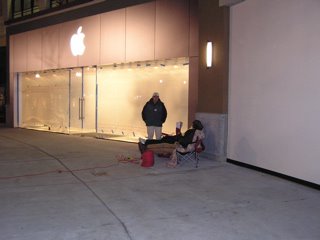 I am going to chronicle my adventure at the grand opening of the Apple Store here in Salt Lake City. I arrived at about 12:30 am and made a short trip into The Gateway to check out the store. The plywood barriers were all down. Plastic covers the windows, and three gentlemen have formed the line. They tell me how to park close and invite me to share the power they have run. Between the power and the Apple Store's Wireless, I am pretty much set for the night.
3:30 am and we were joined by a young couple about 2:00 am. 6 in line and counting. It is quiet except for the occasional train passing behind The Gateway.
Actually managed to sleep for a couple of hours. Woke a few minutes before 6:00 to other voices and see about another 15 in line. Lots of personal Mac histories being shared.
7:40 am and the crowd is starting to grow. There are about 75-80 in line now. The interesting thing is that about 1/4 of them have their Powerbooks or iBooks out. Hmmm... I wonder what their doing. The general contractor is onsite and waiting for the managers to get in. There are now 3 security guards waiting as well and the window washer is working on the outside glass. When the managerss get here they will peel the plastic of off the inside class and clean it.
9:00 am - 1 hour to go. I would estimate the crowd to be between 300-400 at this point but I can't tell for sure any more. The employees are coming out about every five minutes to excite the crowd. The mall management is starting to look a little worried.
9:20 am-The first guy in line is interviewed by a local newstation, then the first three are interviewed by a newspaper reporter for the Salt Lake Tribune. He even gets to me, so I guess I will be in the paper tomorrow.
10:00 am- They allow the first 70 or so people in. Store employees cheering, music blaring, it was awesome. As anyone leaves the store they allow another in. The queue is still huge. As I left I would imaging there were still 500-600 people in line. I talked to an employee who has worked at two other openings and she said this rivaled either one of those. Photos here Podcast and Vidcast to follow by tomorrow.
Friday, November 18, 2005
Here's to the Crazy Ones
The Apple Store in Salt Lake will be opening in a little under 20 hours from now. I will be heading downtown about midnight to check on the line. I don't have to be first, but I do want to be early. I will have picture, a podcast, and even my first vcast from the event posted sometime Saturday or Sunday. If you are from the are and will be at the grand opening look for me. I'll have a bunch of gear with me and shouldn't be too hard to find.
Monday, November 14, 2005
Salt Lake City Apple Store To Open This Weekend
The first Apple Store in Utah will open at 10:00 am this Saturday, November 19th. I have been waiting for this for a long time. I will be there bright and early.
Tuesday, November 08, 2005
I can't wait to get to the car
Steve Dembo at Teach 42 is back with a podcast and it looks like he is back in the saddle again. I can't wait to get to the car an listen to his new show.
Wednesday, November 02, 2005
My Grand Experiment
I began a new professional development class in my district tonight. The title of the course is Using Social Software to Teach the Core Curriculum. I have 8 brave women taking the class. As a group they had very little knowledge about social software. We started with blogs tonight. I gave them a couple of current articles on blogging to read. We set up accounts for each of them at Bloglines and Blogger. We set about 5 feeds I want them to look at over the next week. We also set up a blog on Blogger for the class. They will be commenting on my posts and hopefully creating some posts of their own.
I have the commenting locked down to members of the blog, but if you are interested in follow the progress of these teachers and would like to comment, drop me a line and I will invite you in.
In the coming weeks we will be tackling Wiki's, del.icio.us, and Flickr. I am set for a wild ride. See You in a Few!
I have the commenting locked down to members of the blog, but if you are interested in follow the progress of these teachers and would like to comment, drop me a line and I will invite you in.
In the coming weeks we will be tackling Wiki's, del.icio.us, and Flickr. I am set for a wild ride. See You in a Few!
Thursday, October 27, 2005
The Educational Mac Podcast #25-October 27, 2005
A conversation with Brian Mull about life for 1 technology specialist in New Orleans after Katrina. It is a unique perspective.
We talked about Brian's experiences, his school, some software, and about how his blog evolved. I think this is the most fascinating view of how blogs can be used and how quickly their roll can change. Go to the blog and view it from the start to see how it changed.
We mentioned the Room 208 blog and the newsletter that Bob Sprankle produces using Pages.
Enjoy the Podcast!
See You in a Few!
We talked about Brian's experiences, his school, some software, and about how his blog evolved. I think this is the most fascinating view of how blogs can be used and how quickly their roll can change. Go to the blog and view it from the start to see how it changed.
We mentioned the Room 208 blog and the newsletter that Bob Sprankle produces using Pages.
Enjoy the Podcast!
See You in a Few!
Wednesday, October 19, 2005
The Educational Mac Podcast #24-October 20, 2005
Show Notes
eMac gone for all but education institutional purchase, how long will it last and what's next.
Apple's education shipments on the rise.
A great inservice day! (Tooting my teams horn)
Should some people not use Macs?
Next Show-Special Guest Host: Brian Mull, Technology Director, Trinity Episcopal School in New Orleans
See You in a Few!
Apple's education shipments on the rise.
A great inservice day! (Tooting my teams horn)
Should some people not use Macs?
Next Show-Special Guest Host: Brian Mull, Technology Director, Trinity Episcopal School in New Orleans
See You in a Few!
Thursday, October 13, 2005
One More Thing
The biggest potential One More Thing from Apple's announcement yesterday as far as education goes is the status of the eMac. It has been dropped from every Apple store listing except for educational institution purchasing.
Macworld was finally able to get a response from Apple about the eMac. It apparently is gone for everyone except schools. I have two questions then, 1) How long will the eMac last even for school purchases? and 2) What does Apple have up their sleeve for educational machines for the future?
My guess is that the answers will not be forthcoming until the Intel based Macs start showing up. Apple needs machines in the price niche that the eMacs hit for education. For next year's buying season though I think that makes Apple's position a little shaky. I hope Apple's roadmap for machines for education gets laid out a little more clearly in the next couple of months. Podcast coming! See You in a Few!
Macworld was finally able to get a response from Apple about the eMac. It apparently is gone for everyone except schools. I have two questions then, 1) How long will the eMac last even for school purchases? and 2) What does Apple have up their sleeve for educational machines for the future?
My guess is that the answers will not be forthcoming until the Intel based Macs start showing up. Apple needs machines in the price niche that the eMacs hit for education. For next year's buying season though I think that makes Apple's position a little shaky. I hope Apple's roadmap for machines for education gets laid out a little more clearly in the next couple of months. Podcast coming! See You in a Few!
Wednesday, September 28, 2005
The Educational Mac Podcast #23-September 28, 2005
Show Notes
A conversation (actually sounds more like an interview than we had hoped) with Tony Vincent. Tony is doing great things in his school. He is also a huge Palm® Handheld supporter. He has a great site called Learning in Hand that is devoted to helping teachers use handhelds in the classroom. He is also doing a podcast on handhelds with Mike Curtis called Soft Reset. Tony is also producing podcasts at his school Willowdale Elementary School in Omaha, Nebraska. The podcast is called Radio WillowWeb and the kids do a great job.
We actually recorded this two weeks ago, but it has taken me that long to get around to cleaning it up. It still doesn't sound that great and that is my fault not Tony's. We will give it another shot, if I can convince Tony to come back. Anyway, my apologies to Tony and you the listeners for the lack of quality. I will get it right next time.
See You in a Few!
A conversation (actually sounds more like an interview than we had hoped) with Tony Vincent. Tony is doing great things in his school. He is also a huge Palm® Handheld supporter. He has a great site called Learning in Hand that is devoted to helping teachers use handhelds in the classroom. He is also doing a podcast on handhelds with Mike Curtis called Soft Reset. Tony is also producing podcasts at his school Willowdale Elementary School in Omaha, Nebraska. The podcast is called Radio WillowWeb and the kids do a great job.
We actually recorded this two weeks ago, but it has taken me that long to get around to cleaning it up. It still doesn't sound that great and that is my fault not Tony's. We will give it another shot, if I can convince Tony to come back. Anyway, my apologies to Tony and you the listeners for the lack of quality. I will get it right next time.
See You in a Few!
Wednesday, August 24, 2005
The Educational Mac Podcast #22-August 24, 2005
Show Notes for August 24, 2005
New Blog location
Henrico Disaster–Which One!
Cobb County Disaster–Is the witch hunt over?
At least some school systems get it right! Vail Arizona Chatham County, NC
iMovie vs. Windows Movie Maker
Windows Version of iLife?
Blog and Podcast Pick of the Show
Why do we have to put up with this Windows crap?
Seeking out fellow Mac Using Educators who would like to participate in the podcast as a guest co-host.
See You in a Few!
Blog and Podcast Pick of the Show
Why do we have to put up with this Windows crap?
Seeking out fellow Mac Using Educators who would like to participate in the podcast as a guest co-host.
See You in a Few!
Call for Co-hosts
I hope to have a new show out in the next 24 hours. In the meantime, I have been tossing around an idea in my head for the past couple of weeks and I think I am ready to share it with anybody interested. I would like to try having some co-hosts on the podcast. I am not sure if I am I looking for permanent co-hosts or temporary. I would like to try it out and see though. So if you would be interested in co-hosting an episode of The Educational Mac Podcast drop me a note at kdumont@mac.com or theeducationalmac@gmail.com.
See You in a Few!
Tuesday, August 16, 2005
Maybe this wasn't the best idea Henrico has had
What would you do for a $50 iBook? I would hope not bash people with chairs, trample a child's stroller, or apparantly completely obliterate a flip-flop. Come on people let's have a little civility!"
Too Many To Fix?
Steve writes about a challenge given to the staff at his new school to fix three of their own broken windows. It started me thinking about which of my broken windows I would and should choose to work on.
One of my initial thoughts was that I have too many broken windows to begin fixing any of them. Then I realized that was probably the first that I should work on. I have a tendency to get down on myself for not accomplishing all that I should in a given day. I need to continually remind myself that there is only so much time in a day and I need to plan accordingly.
This leads to window the second for me. That is to not let me stretch myself too thin. I find myself more and more taking on things I shouldn't. My plate is pretty full and adding things only complicates when I should really be simplifying. I need to learn to say no gracefully and tactfully.
My third broken window which these other two impact deals with my family. I spend more time at the keyboard when I am at home than I should. I need to work out a more efficient schedule so that when I am home with the family, I am with the family.
I know this would help my relationship with my more than patient wife.
teach42
Sunday, August 07, 2005
The Educational Mac Podcast #21-August 7, 2005
In this show-
Moving files to Ourmedia.org
New Mac Hardware-iBooks (boring), Mac Mini's (intriguing $699 model), Mighty Mouse (I think I want one bad!)
Apple in Education News Broward County (Good) Henrico County (Bad) Cobb County (Ugly)
Laptop installation at new school
Educational Blogs and Podcasts That I Follow Blogs-Teach 42, Exactly 2 Cents Worth, One Big Head
Podcasts-Teach 42, Connect Learning, Bit by Bit
General Podcast Opinions
iTunes Podcast Support 6 Weeks Later
Contact Information
See You in a Few!
Moving files to Ourmedia.org
New Mac Hardware-iBooks (boring), Mac Mini's (intriguing $699 model), Mighty Mouse (I think I want one bad!)
Apple in Education News Broward County (Good) Henrico County (Bad) Cobb County (Ugly)
Laptop installation at new school
Educational Blogs and Podcasts That I Follow Blogs-Teach 42, Exactly 2 Cents Worth, One Big Head
Podcasts-Teach 42, Connect Learning, Bit by Bit
General Podcast Opinions
iTunes Podcast Support 6 Weeks Later
Contact Information
See You in a Few!
Saturday, July 16, 2005
The Educational Mac Podcast #20-July 16, 2005
In this cast...
Milwaukee-area school drops Macs for Windows PCs, thanks to PTA Inquiry into Cobb County Apple iBook Bids Arizona High School Will Not Use Textbooks Art Rage by Ambient Design
Not much of a NECC wrapup. I forgot to mention in the podcast that I am changing the location of the files to ourmedia.org. If you have any problems let me know at kdumont@mac.com. See You in a Few!
Milwaukee-area school drops Macs for Windows PCs, thanks to PTA Inquiry into Cobb County Apple iBook Bids Arizona High School Will Not Use Textbooks Art Rage by Ambient Design
Not much of a NECC wrapup. I forgot to mention in the podcast that I am changing the location of the files to ourmedia.org. If you have any problems let me know at kdumont@mac.com. See You in a Few!
Wednesday, July 13, 2005
Hold on there!
I will get a new show out tonight or tomorrow. In the meantime, iTunes fixed my feed somehow and I am getting a little concerned about a bandwidth hit, so if suddenly you can't get to the show, it is because I have temporarily pulled the plug while I move the audio content over to Ourmedia.
See You in a Few!
See You in a Few!
Thursday, June 30, 2005
Leaving Philly
Yesterday was a relaxing day. I actually slept in and it felt great. I timed it just right to get a Philly Cheese Steak at Rick’s in the Reading Terminal. This was my third attempt. The first day I tried there was nearly and hour wait in line. The second time I went later in the day, like about 2:30 and they were sold out and closing. It was really good. 3 friends from Utah were like 4 people behind me so we were able to talk during lunch. I went and spent the next 45 minutes with a vendor that we buy software from looking at their new and updated products.
This brings me to the issue of the exhibition floor. I spent less than 1 hour total in the exhibit hall. The reason is that it has looked basically the same for the last 3 years. There are slight updates to software, there are all kinds of solutions to help you mine your data for NCLB, there are 8,000 different kinds of students response systems. There is just nothing new or exciting. I felt it much more worth my time to spend my time in sessions. I did not gather one pin, one t-shirt, one demo disk, or catalog. Nada, nothing, Zip. My kids are going to be really disappointed.
I was able to attend David Warlick’s spotlight session on Redefining Literacy for the 21st Century. I have read over this material several times, but David does a great job of presenting it with passion, so it was great to see him present it. I blogged the session, but when I posted it through the Dash Blog widget it got lost. So I will point you instead to the SEGA Tech blog for their blog of the session.
I then went to a presentation call Professional Development in your Pajamas. This is where my policy for this conference really bit me in the butt. I made a pledge I would not walk out of a session I had chosen unless it was so awful. Well this one wasn’t awful, but it wasn’t what I thought it would be either. It was basically a team from a district in San Antonio describing a grant project they had developed and worked on. They spent the hour going over the project and not really talking much about the PD piece of the project. I really should have broken my pledge for this one. I have already blogged about the Action in the Classroom session so you can view that on it’s own. It really was pretty good. I went to the beginning of the Podcasting Birds-of-a-Feather session. This was facilitated by Mike Lawrence, the Executive Director of CUE. He basically turned it into a conversational forum. Unfortunately I had to leave after about 15 minutes to go to dinner with our district group. One of the first things I heard though bothered me a little. A representative from a publisher got up and asked and talked about interest in them producing their materials in audio format. I wanted to scream. Although I can see some educational benefit in them doing so, the whole idea of these companies charging huge amounts of money for this ticks me off.
Our district group had our yearly NECC dinner together at the City Tavern. This is one of the most famous restaurants in Philadelphia. It is actually a reconstruction of the Old City Tavern. The tavern was a gathering place for many of the founding fathers after long days of try to create a democracy. The original tavern actually burned and was rebuilt several times. The last time it burned the property sat for some time. Finally the park service decided to rebuild it and make an eating establishment out of it. The meal was a 3 course affair beginning with a selection of appetizers ranging from crabcakes to ham wrapped asparagus. I then selected the Cream of Mushroom soup for my next course and it was wonderful. I selected the Turkey Pot Pie for my main course and was surprised at the size of it. It was delicious. Finally for dessert I chose the Chocolate Mousse Cake with a raspberry drizzle. Again it was fantastic. I absolutely rolled out of the place afterwards. It was a good thing we walked there and back from our hotel about 15 blocks each way.
To cap the evening I attended the Podcast mixer that Steve Dembo at Teach42 organized. All four of us had a good time conversing together. I thought we would gather a few more, but it was great spending more time with Steve.
This morning I got up and took the 90 min. open bus tour. I hadn’t done anything really touristy, so I felt like I should probably see a little more of the city. I am kind of wishing that I had went to a couple of session instead, but oh well. I did get to see the stage for the Live 8 concert this weekend. If i though Philly was a little wild this week, it is going to be absolutely nuts this weekend, I am glad we were able to get out of town.
Although getting out of town was a little more difficult than anticipated. We made sure we got to the airport in plenty of time for our flight. Then came about two hours of standing in line to get our boarding passes gathered and bags checked. In the middle of this we noticed that our flight was delayed. First 30 minutes and then an hour. This actually worked to our benefit as it took us so long to get through United’s ticket line.The adventure was not quite over yet though. We had a connecting flight in Chicago and with the original flight time we only had about 40 minutes to switch flights and at different terminals to boot. Well we found out that our connecting fligh was slightly delayed as well, so we felt better. We loaded on the jet and backed from the gate, started to taxi and then stopped. We sat on the tarmac for a little over an hour. The pilot finally explained that there were several weather related delays particularly related to flights in and out of Chicago. About 3 1/2 hours after our original departure time, we left Philly. We were imagining that we would not be getting out of Chicago until late tonight. However, we were informed that our connecting flight had been substantially delayed as well and we would make it. We made not quite a mad dash from Terminal B to Terminal F in Chicago, but made the flight in plenty of time. So I will get this posted tonight.
For me this conference was about the workshops and sessions attended and most especially about the people I was able to meed after reading and listening to their online work. I will remember it for friendships made and ideas shared. I am looking forward to San Diego next year already.
See You in a Few! necc
This brings me to the issue of the exhibition floor. I spent less than 1 hour total in the exhibit hall. The reason is that it has looked basically the same for the last 3 years. There are slight updates to software, there are all kinds of solutions to help you mine your data for NCLB, there are 8,000 different kinds of students response systems. There is just nothing new or exciting. I felt it much more worth my time to spend my time in sessions. I did not gather one pin, one t-shirt, one demo disk, or catalog. Nada, nothing, Zip. My kids are going to be really disappointed.
I was able to attend David Warlick’s spotlight session on Redefining Literacy for the 21st Century. I have read over this material several times, but David does a great job of presenting it with passion, so it was great to see him present it. I blogged the session, but when I posted it through the Dash Blog widget it got lost. So I will point you instead to the SEGA Tech blog for their blog of the session.
I then went to a presentation call Professional Development in your Pajamas. This is where my policy for this conference really bit me in the butt. I made a pledge I would not walk out of a session I had chosen unless it was so awful. Well this one wasn’t awful, but it wasn’t what I thought it would be either. It was basically a team from a district in San Antonio describing a grant project they had developed and worked on. They spent the hour going over the project and not really talking much about the PD piece of the project. I really should have broken my pledge for this one. I have already blogged about the Action in the Classroom session so you can view that on it’s own. It really was pretty good. I went to the beginning of the Podcasting Birds-of-a-Feather session. This was facilitated by Mike Lawrence, the Executive Director of CUE. He basically turned it into a conversational forum. Unfortunately I had to leave after about 15 minutes to go to dinner with our district group. One of the first things I heard though bothered me a little. A representative from a publisher got up and asked and talked about interest in them producing their materials in audio format. I wanted to scream. Although I can see some educational benefit in them doing so, the whole idea of these companies charging huge amounts of money for this ticks me off.
Our district group had our yearly NECC dinner together at the City Tavern. This is one of the most famous restaurants in Philadelphia. It is actually a reconstruction of the Old City Tavern. The tavern was a gathering place for many of the founding fathers after long days of try to create a democracy. The original tavern actually burned and was rebuilt several times. The last time it burned the property sat for some time. Finally the park service decided to rebuild it and make an eating establishment out of it. The meal was a 3 course affair beginning with a selection of appetizers ranging from crabcakes to ham wrapped asparagus. I then selected the Cream of Mushroom soup for my next course and it was wonderful. I selected the Turkey Pot Pie for my main course and was surprised at the size of it. It was delicious. Finally for dessert I chose the Chocolate Mousse Cake with a raspberry drizzle. Again it was fantastic. I absolutely rolled out of the place afterwards. It was a good thing we walked there and back from our hotel about 15 blocks each way.
To cap the evening I attended the Podcast mixer that Steve Dembo at Teach42 organized. All four of us had a good time conversing together. I thought we would gather a few more, but it was great spending more time with Steve.
This morning I got up and took the 90 min. open bus tour. I hadn’t done anything really touristy, so I felt like I should probably see a little more of the city. I am kind of wishing that I had went to a couple of session instead, but oh well. I did get to see the stage for the Live 8 concert this weekend. If i though Philly was a little wild this week, it is going to be absolutely nuts this weekend, I am glad we were able to get out of town.
Although getting out of town was a little more difficult than anticipated. We made sure we got to the airport in plenty of time for our flight. Then came about two hours of standing in line to get our boarding passes gathered and bags checked. In the middle of this we noticed that our flight was delayed. First 30 minutes and then an hour. This actually worked to our benefit as it took us so long to get through United’s ticket line.The adventure was not quite over yet though. We had a connecting flight in Chicago and with the original flight time we only had about 40 minutes to switch flights and at different terminals to boot. Well we found out that our connecting fligh was slightly delayed as well, so we felt better. We loaded on the jet and backed from the gate, started to taxi and then stopped. We sat on the tarmac for a little over an hour. The pilot finally explained that there were several weather related delays particularly related to flights in and out of Chicago. About 3 1/2 hours after our original departure time, we left Philly. We were imagining that we would not be getting out of Chicago until late tonight. However, we were informed that our connecting flight had been substantially delayed as well and we would make it. We made not quite a mad dash from Terminal B to Terminal F in Chicago, but made the flight in plenty of time. So I will get this posted tonight.
For me this conference was about the workshops and sessions attended and most especially about the people I was able to meed after reading and listening to their online work. I will remember it for friendships made and ideas shared. I am looking forward to San Diego next year already.
See You in a Few! necc
Wednesday, June 29, 2005
Action in the Classroom-Dan Greenwood
This is a session on Digital Video Productions in the classroom. Dan is a curriculum director for a private school in Virginia. He begins by talking about how he got invovled in DV. He is an Adobe Master Teacher, he uses both Adobe Premiere Elements and iMovie. Well he is half right anyway. Actually I have been hearing a lot of good things about Premiere Elements.
Video's Positive Attributes- 1)Communication vehicle-visual(aesthetic element), auditory 2)Part of the Students Culture
Educational Benefits 1)Cooperative learning 2)Touches every learning style 3)Honors all multiple intelligences 4)Cross curricular 5)Requires content mastery
Bloom's Taxonomy creating film encompases Knowledge, comprehension, application/analysis, and synthesis/evaluation
Video Projects in Context 1)Culmination/significant activity 2)Cross curricular activity 3)Option for project 4)Extra curricular activity
How to conduct a video project in a classroom 1)Develop a Project idea 2)Structure activity as appropriate 3)Determine project parameters with rubric 4)Establish schedule-preproduction, production, postproduction
Assign students to video crews Use lexicon and established procedures of trade
Production Process Preproduction-Plan Script/Storyboard Production-Shoot Raw footage Postproduction-Edit Final Production
Video Genres Reality TV-Use for a cheap quick film-examples (Duck, teapot song, gossip) Educational Video-To introduce or explain concepts Documentary-Students as recorders of history News Report-Students as reporters Drama Foreign Film Commercial or PSA Music Video Video Montage Had to leave at this point, but knows what he is doing and is explaining it very well. necc
Video's Positive Attributes- 1)Communication vehicle-visual(aesthetic element), auditory 2)Part of the Students Culture
Educational Benefits 1)Cooperative learning 2)Touches every learning style 3)Honors all multiple intelligences 4)Cross curricular 5)Requires content mastery
Bloom's Taxonomy creating film encompases Knowledge, comprehension, application/analysis, and synthesis/evaluation
Video Projects in Context 1)Culmination/significant activity 2)Cross curricular activity 3)Option for project 4)Extra curricular activity
How to conduct a video project in a classroom 1)Develop a Project idea 2)Structure activity as appropriate 3)Determine project parameters with rubric 4)Establish schedule-preproduction, production, postproduction
Assign students to video crews Use lexicon and established procedures of trade
Production Process Preproduction-Plan Script/Storyboard Production-Shoot Raw footage Postproduction-Edit Final Production
Video Genres Reality TV-Use for a cheap quick film-examples (Duck, teapot song, gossip) Educational Video-To introduce or explain concepts Documentary-Students as recorders of history News Report-Students as reporters Drama Foreign Film Commercial or PSA Music Video Video Montage Had to leave at this point, but knows what he is doing and is explaining it very well. necc
Podcasting Mixer
Those at NECC and you know who you are! The podcasting mixer Steve Dembo has been trying to organize will be at Tir Na Nog at 1600 Arch street. For a google map go to Teach42. On another note, my post on David Warlick's session today has apparently gone to the great void. It was a great session, I hope those notes show up eventually.
Tuesday, June 28, 2005
The Educational Mac Podcast #19-June 28, 2005
Apple hits at least a triple with iTunes 4.9, they may even be able to leg it into an inside the park HR.
I meet Steve Dembo and it ends up being even cooler than I thought it would be. It seems Apple Education loves Teach42. Great blogging workshop this morning.
See You in a Few! necc
I meet Steve Dembo and it ends up being even cooler than I thought it would be. It seems Apple Education loves Teach42. Great blogging workshop this morning.
See You in a Few! necc
Adding to the Chorus of Boos
Let me add my 2 cents worth (With apologies to David). It really is not good that the preeminant educational technology conference does not supply wireless access in the session rooms of the conference. In the past 2 yrs. (New Orleans and Seattle) coverage has been a little spotty in the rooms, but you could usually get out. Not here. I am really disappointed.
necc
Visual Literacy with Lynell Burmark
This is a another of those things I have been waiting for a long time. I have wanted to hear Lynell Burmark speak for 3 years. Finally I get my chance. When she presents is not what is on her handout, but it is the information provided in the handout. She uses black screens to indicate transitions in her PowerPoint. She begins by saying that we live in a visual world. She talks about the progression from verbal to visual to written and now back to visual communication. We process visuals 60,000 times faster than text. When we process text it has to be done sequentially. An image is processed almost instantenously. "I didn't think...until I saw."-Eugene. What you get is what you see. She suggests using images to start classwork at the beginning of the day, a unit, etc. Also use the image as part of an assessment at the end. Also need to counterbalance what kids are seeing on TV such as murders. Talking now about the healing power of appropriate images. Now color power, we recall or retain information 80% better if image is in color. Different colors give different effects.
PowerPoint (presentation tips) 30 million PP presentations given every day. Use images on slides, put information on handouts. Retention and transfer both go down when the presenter reads bullet points from the slide. Graphics on left so your eye is not jumping back and forth. Use for flash cards, things with minimal information. Use to put an image up on the screen as students com into the room. Use Georgia and Verdana as they are not as squished. You can read lower case about 30,000 times faster than all caps.Gave a great Photoshop tip on straightening images. Enjoyable Session. necc
Effective Weblogs in Education Workshop
Tim Laurer, Tom Hoffman, Steve Burt, & Anne Davis (via Skype) Starting with Steve Burt introducing everyone and having us login to a blog they set up for this session. There seems to be a problem with the blog they have setup amd we can't get into. Tim is carrying on while they work on it. Tim is talking about his experiences and introduction to rss and blogging. He went pretty extensively through the Lewis Elementary site and how he uses it.
Steve has the site back up and working and is explaining how to use the Moveable Type engine, mostly for novices.
A question is asked about the difference between listservs and blogs. Tom talks about the ability to subscribe to what you want and not having to put up with Trolls and the like.
Anne is now presenting her part of the session. This is the page she set up for the session.
Tom is now talking about teachers weblogs. He asked for hands of those who have read teachers weblogs and what they think. He is talking about those blogging anonymously and those who are more "out" with theirs. He is urging educators to be professional and discrete in what they blog. He is encouraging teachers to blog under their own name so that they may feel a little inhibited so things don't come back and bite them in a few months or years.
There are a few questions about implementing.
Ben Harris is now talking about Wordpress. I enjoyed the information presented in this session. necc
Steve has the site back up and working and is explaining how to use the Moveable Type engine, mostly for novices.
A question is asked about the difference between listservs and blogs. Tom talks about the ability to subscribe to what you want and not having to put up with Trolls and the like.
Anne is now presenting her part of the session. This is the page she set up for the session.
Tom is now talking about teachers weblogs. He asked for hands of those who have read teachers weblogs and what they think. He is talking about those blogging anonymously and those who are more "out" with theirs. He is urging educators to be professional and discrete in what they blog. He is encouraging teachers to blog under their own name so that they may feel a little inhibited so things don't come back and bite them in a few months or years.
There are a few questions about implementing.
Ben Harris is now talking about Wordpress. I enjoyed the information presented in this session. necc
Monday, June 27, 2005
The Educational Mac Podcast #18-June 27, 2005
NECC Podcast #1
ISTE Affiliate Meeting
Hands-on Digital Storytelling: Movie Making Made Simple ... and Fun!
David Weinberger Keynote
Possible Apple Announcement Tomorrow
Maybe at the Podcasting Event?
See You in a Few!
necc
More Digital Storytelling
This afternoon we divided into teams of three and made movies. I had the privilege of working with Tom Horn from Rexford, New York and Annette Chamberlain from Fairview Heights, Illinois. With the theme of Voices and Revolution, we made a film call Simple Acts about the revolution in how people with disabilities are treated. It was a little light hearted and a whole lot of fun working with these two great educators. necc
Digital Storytelling from ADE's
Class taught by several ADE's including Marco Torres and Don Henderson. Talking about visual grammar. POV, Different Shots
10 commandments- Light-White Balance, No light, no picture, Light influences mood, emotion, light metering-use your hand, shadows-soft vs. hard Composition-Rule of thirds, pay attention to the intersections not the squares Get a tripod, keep camera movement to a minimum, pant, tilt, or zoom only for a purpose, walk like Groucho if you have to. Hold your breath for the close up shot. Keep the lens clean. Sound-Makes or breaks your movie, Mics-Handheld, lavaliere, boom, Camera mic & your closet-Buy one(any or all three), record ambient noise, room tone. record narration into camera, not the computer, headphones are a must, level your sound in FCP between 9-12 Light- Composition- Sound- Light- Composition- Sound- Light+Composition+Sound
Shooting Tips- be aware that you're in a team, shoot multiple takes, not them on the storyboards, separate shots using a slate, clapper, get permission forms if necessary.Software Tools suggested-Comic Life, Inspiration Storyboarding-give a scene in words and make them draw it.
Marco Torres examples http://homepage.mac.com/torres21 Planning sheet http://sfett.net/process.html necc
10 commandments- Light-White Balance, No light, no picture, Light influences mood, emotion, light metering-use your hand, shadows-soft vs. hard Composition-Rule of thirds, pay attention to the intersections not the squares Get a tripod, keep camera movement to a minimum, pant, tilt, or zoom only for a purpose, walk like Groucho if you have to. Hold your breath for the close up shot. Keep the lens clean. Sound-Makes or breaks your movie, Mics-Handheld, lavaliere, boom, Camera mic & your closet-Buy one(any or all three), record ambient noise, room tone. record narration into camera, not the computer, headphones are a must, level your sound in FCP between 9-12 Light- Composition- Sound- Light- Composition- Sound- Light+Composition+Sound
Shooting Tips- be aware that you're in a team, shoot multiple takes, not them on the storyboards, separate shots using a slate, clapper, get permission forms if necessary.Software Tools suggested-Comic Life, Inspiration Storyboarding-give a scene in words and make them draw it.
Marco Torres examples http://homepage.mac.com/torres21 Planning sheet http://sfett.net/process.html necc
Saturday, June 25, 2005
Philadelphia, Here We Are!
Our entourage arrived in 15 pieces (people) this evening. We took a little walk from our hotel (Courtyard by Marriott) and dined at the Nodding Head Brewery. It was quaint and the food was good, although my favorite part was the bobble head collection. The first NECC ADE Podcast has been posted. My first 'cast will come Monday night, unless I have lots of energy after dinner tomorrow. For me, tomorrow is a full day at the ISTE Affiliates Meeting, then some place fun for dinner.
See You in a Few! NECC
See You in a Few! NECC
Thursday, June 23, 2005
The Educational Mac Podcast #17
Wednesday, June 22, 2005
5 days until NECC
Okay, with 5 days left before NECC begins, here is a rundown on what I will be up to.
Sunday June 26th ISTE Affiliate Meeting All Day
Monday June 27th Full Day Workshop-Hands On Digital Storytelling. I am most excited about this bcause one of the facilitators is Marco Torres. I have admired his work with his students and filmaking for several years.
Tuesday June 28th Half Day Workshop-Effective Weblogs in Education. I am excited about this one as well. It will be led by Will Richardson, Tim Lauer and others whose blogging in education has been such great examples to me.
Tuesday night is the Student Film Festival which I am excited to view. Then there is the Apple sponsored Premiere Podcast Party. Knowing more about Apple's podcasting plans, I hope there are a few more details given here.
Wednesday June 29th-The highlight of the day for me will be to get to see and listen to David Warlick's keynote on Redefining Literacy for the 21st Century.
The district group I am attending NECC with will also be eating at the City Tavern that evening. I am excited about eating in such a historic venue.
Thursday June 30th-This will be a shortened day as we will be leaving mid-day, but I hope to attend as many sessions as I can.
Right now my biggest concern is when I will have time to spend in the exhibition hall. See You in a Few! Any who are going to NECC, hope to meet you there.
Thursday, June 09, 2005
The Educational Mac Podcast #16
The Educational Mac Podcast #16-June 10, 2005
Shownotes:
A rambling wreck of a podcast.
My brief musings on the Apple/Intel news and the impact on Macs in education.
Cobb County Schools sued over laptop initiative.
From MacDailyNews
Macon County Journal
David Warlick’s interview with Bob Spranckle of Room 208 podcast, give it a listen.
Podcatching in iTunes 4.9
iPodderX
CosmicBlobs -Modeling and Animation Software
Looking forward to NECC
Mini-Casts from Philly June 27, 28, 29
Show length-Goal to keep casts’ to 20 minutes
See You in a Few!
Thursday, May 26, 2005
Podcatching in iTunes 4.9
You have surely read this elsewhere by now. But Steve Jobs announced earlier this week that iTunes 4.9 which is due in a couple of months will include the ability to subscribe to rss feeds for podcasts (and extensibly all others.) Rexblog discusses some possible easily foreseeable extensions to this capability.
I am off for a weekend in the sun. There will be no cast this week, but there will be on June 1st.
See You in a Few!
Monday, May 23, 2005
The Educational Mac Podcast #15
The Educational Mac, Podcast 15, Saturday, May 21st
Welcome to the Educational Mac Podcast. I apologize for the late show this week, but life has been crazy for a couple of weeks. Just as things are settling down at work as the school year begins to wind down, illness finds its way into the house. My son has not been at school in five weeks now. Three weeks of this was planned as our elementary operates on a year-round schedule and he was on a 3 week break. However, the coughing that began 3 days before he was to go back and the pneumonia that followed has kept him out the last 2 weeks.
He was even to sick to play baseball, too sick to even want to play ball. That’s how we really knew how sick he was. His team is undefeated 11 games into the season and it has killed him not to be able to play these last 2 weeks. Anyway, he is finally getting well, but I took a lot of time off caring for him. The funny thing was, things at work started to pick up again as well. Thanks to email and iChat I was able to accomplish a lot of what I needed to while staying at home and caring for the boy.
If there was a week I didn’t want to be late with the podcast, this was it. There actually hasn’t been a lot of Mac related educational news this past week, but some things kind of poked their heads up the last couple of days.
Cobb County Developments Macsimum News Coverage Cobb County BOE Press Release University of Georgia bow out of evaluation
Also, I apparently have a retraction to make from the blog, as the podcasting event that appeared on the social calendar for NECC disappeared today. NECC Social Calendar sans podcasting event
Steve Brooks over at the Edugadget blog posts about some new iPod software that looks promising in some ways. Edugadget Post on iStory Creator iStory Creator Homepage
Finally, from the sometimes wishes do come true department, information directly from a Henrico County Schools employee.
See You in a Few!
Cobb County Developments Macsimum News Coverage Cobb County BOE Press Release University of Georgia bow out of evaluation
Also, I apparently have a retraction to make from the blog, as the podcasting event that appeared on the social calendar for NECC disappeared today. NECC Social Calendar sans podcasting event
Steve Brooks over at the Edugadget blog posts about some new iPod software that looks promising in some ways. Edugadget Post on iStory Creator iStory Creator Homepage
Finally, from the sometimes wishes do come true department, information directly from a Henrico County Schools employee.
See You in a Few!
Thursday, May 19, 2005
Late Night Podcasting Lounge at NECC
Just read this from the NECC RSS Feed.
The Late-nite Podcasting Lounge will be hosted by Apple, showcasing the emerging trend of podcasting and its impact on education. Outstanding examples of educational podcasts along with classroom integration strategies will be showcased. Come see for yourself how easy it is to use podcasting to impact learning! Since the event is late, you'll be bribed with food, drinks, and even some iPod give-aways ... bring your own iPod to throw into the party mix after the session!
Almost sounds like Apple's first public acknowledgement of podcasting. Could it be?
See You in a Few!
Wednesday, May 18, 2005
Late 'Cast This Week
Life is getting in the way of the podcast so far this week. It may be Friday before it gets out. When it does look for some inside information as to what happened to Apple in Henrico.
See You in a Few!
Friday, May 13, 2005
Now for a Useful Widget
Over the course of the past several days, I have downloaded about a dozen Widgets for OSX Tiger. Some of the widgets have proved more useful than others. One of the most usefule is AirTraffic Control by Spintriplet.com. It allows you to see what Airport and other wireless access points are in range. For example, right now it is showing a new wireless point that just popped up in my neighborhood. Now another Widget that was published just the other day is not so useful, but works for a great quick diversion. It is a Minesweeper widget. Small, but cool.
Finally, is the widget I am using right now, called Dashblog. If it works, I think I will find myself publishing to the blog much more often, because it is right out there for me to see whenever I invoke Dashboard.
I hope it works well.
See You in a Few!
Finally, is the widget I am using right now, called Dashblog. If it works, I think I will find myself publishing to the blog much more often, because it is right out there for me to see whenever I invoke Dashboard.
I hope it works well.
See You in a Few!
Wednesday, May 11, 2005
The Educational Mac Podcast #14
TEM Podcast #14
May 11, 2005
New iMacs and eMacs
Cobb County Dialogue
We're #1 Technology Counts 2005
Future of Podcasting My personal vision of the future of podcasting
New iMacs and eMacs
Cobb County Dialogue
We're #1 Technology Counts 2005
Future of Podcasting My personal vision of the future of podcasting
Wednesday, May 04, 2005
The Educational Mac Podcast #13

Tonight's show includes my own little
Tiger Review
Including my take on Spotlight
Dashboard
Safari RSS
iChat AV 3 including my disappointment
QuickTime 7 (This podcast was recorded entirely in QT 7)
Dictionaries see sidebar
The latest from Henrico and Cobb Counties
Tiger Tactics
Mac win in a small way
Interview Next Week
See You in a Few!
The latest from Henrico and Cobb Counties
Tiger Tactics
Mac win in a small way
Interview Next Week
See You in a Few!
Monday, May 02, 2005
Tigerize Me
Okay, I got Tiger sooner than expected. Work came through rather quickly with a copy. I had backed up last weekend in case I was able to obtain a copy. So I took a chance and just updated with Tiger. The update ran fine, the machine restarted and wouldn't finish loading the OS. Great! I restarted once, everything came up and this machine has purred ever since.
I love this OS. Even with just updating the OS everything runs faster. I am especially impressed with how fast Safari is loading everything, but especially images. I imported my RSS feeds from Firefox, updated them and they are working great. I like the look of the reponse page for feeds much better than Sage in Firefox.
I am really liking Spotlight as well. My drive indexed in about 20 minutes. I was expecting it to take much longer. I never got Quicksilver to work right for me, but Spotlight works really well for what it is supposed to do. I don't know about "expert" Mac users, but I think teachers will really love Spotlight.
Dashboard is really fun, really cool, and really looks good. I don't think it will improve my workflow in any way, but it is really fun, really cool and really looks good.
I like the changes to Mail as well. I like being rid of the drawer. That always bugged me. Overall it just is cleaner to deal with for me.
Now let me get my rant out. The thing I was most looking forward to with Tiger was the new iChat AV. 10 in an audio chat, 4 in a video chat, cool, cool, cool! Oh, but wait, hold the phone. Come to find out there are some limitations to these functions. With my Powerbook G4 1.5 I can initiate and participate in an audio chat of more than two. However, I cannot initiate only participate in a video chat involving more than two machines. I don't get mad at Apple very often, but I am pissed about this one. Maybe I wasn't listening very well at some point, but I never heard anyone or saw anything saying I would have to have a DP G4 or a G5 to utilize all of the features of the new iChat. Boo on not letting the word out louder.
Aside from that however, I am very pleased with Tiger. About 10 of us in the office loaded it today, and for the most part installation went well. One guy's email didn't quite make the transition, but he'll live.
Other than my gripe, I have to say that Apple did a pretty good job with this update and I look forward to them making it even better.
See You in a Few!
I love this OS. Even with just updating the OS everything runs faster. I am especially impressed with how fast Safari is loading everything, but especially images. I imported my RSS feeds from Firefox, updated them and they are working great. I like the look of the reponse page for feeds much better than Sage in Firefox.
I am really liking Spotlight as well. My drive indexed in about 20 minutes. I was expecting it to take much longer. I never got Quicksilver to work right for me, but Spotlight works really well for what it is supposed to do. I don't know about "expert" Mac users, but I think teachers will really love Spotlight.
Dashboard is really fun, really cool, and really looks good. I don't think it will improve my workflow in any way, but it is really fun, really cool and really looks good.
I like the changes to Mail as well. I like being rid of the drawer. That always bugged me. Overall it just is cleaner to deal with for me.
Now let me get my rant out. The thing I was most looking forward to with Tiger was the new iChat AV. 10 in an audio chat, 4 in a video chat, cool, cool, cool! Oh, but wait, hold the phone. Come to find out there are some limitations to these functions. With my Powerbook G4 1.5 I can initiate and participate in an audio chat of more than two. However, I cannot initiate only participate in a video chat involving more than two machines. I don't get mad at Apple very often, but I am pissed about this one. Maybe I wasn't listening very well at some point, but I never heard anyone or saw anything saying I would have to have a DP G4 or a G5 to utilize all of the features of the new iChat. Boo on not letting the word out louder.
Aside from that however, I am very pleased with Tiger. About 10 of us in the office loaded it today, and for the most part installation went well. One guy's email didn't quite make the transition, but he'll live.
Other than my gripe, I have to say that Apple did a pretty good job with this update and I look forward to them making it even better.
See You in a Few!
Subscribe to:
Posts (Atom)